
HTML Editor Online - Live Preview, WYSIWYG & HTML Cleaner
Free online HTML editor with live preview. Write, edit and clean HTML code instantly in your browser with WYSIWYG tools. Import DOCX or HTML and export clean, ready-to-use code.
Instant preview
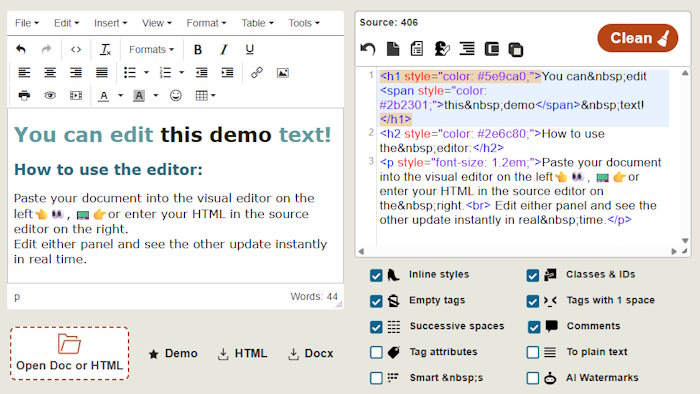
Edit visually on the left and adjust the HTML on the right. Perfect for those who need full control over both the visual text and the code.
Clean messy code
Remove inline styles, empty tags, comments, classes, IDs and spacing issues with one click or run just one of the cleanup rules on demand.
In your browser
No install, no registration, no waiting. Open HTML or visual files, keep a local draft in your browser, and export your work.
Features
The page combines a WYSIWYG editor, a code viewer and an HTML cleaner in one free online tool.
Visual editor on the left
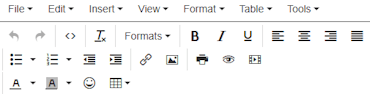
Format headings, paragraphs, links, lists, images, tables, colors and alignment without touching raw code.
Source editor on the right
Edit the syntax-highlighted HTML code with tag matching, line wrapping and a resizable code area.
Panels stay in sync
Changes in the visual editor update the code, and source edits refresh the preview in real time. You can work in either panel.
Import and export
Open .html, .htm and .docx, then download a clean HTML file, a ZIP package with images, or a DOCX document.
Built in cleaning tools
Works great for pasted Word or other RTF documents, or when you copy HTML code from another website with alien classes, and for AI-generated text that needs to be simplified before publishing.
Local draft saving
Smaller drafts are auto-saved in your browser using localStorage, so your backup stays safe on your device without ever leaving.
How to use?
The fastest workflow for editing and cleaning HTML.
Paste or open content
Type directly in the text areas, paste from Word or a website, or load an existing HTML / DOCX file.
Edit visually or in code
Use the rich-text toolbar for quick formatting, then jump to the source panel when you want direct HTML control.
Run cleanup
Turn on the rules you need (under the source code), then click Clean to remove unnecessary markup and normalize the source.
Download the result
Save as HTML, or DOCX. The result will be zipped if your .html file references local images.
Control panel
These controls allow fast editing and safe cleanup. Experiment with these options by loading the demo content and trying what the cleaning options do.
Under the WYSIWYG
- Open Doc or HTML file by clicking here or dragging it into this area.
- Demo loads a sample page HTML code with inline styles and other messed up code to help you practice.
- HTML downloads the source. Pages with embedded image data are packed in a ZIP package with an HTML file and an images folder. It downloads a single .html file if your content doesn't contain any images.
- Docx exports what you see in the visual editor as a Word document. This is why you can use this tool as an online Word editor, even if you have nothing to do with HTML code.
Above the source
- Undo reverses the last cleaning or other source edit. Note that there's a separate Undo above the visual editor and the source code.
- New page clears the editor and starts from an empty document.
- Lipsum appends 5 paragraphs of "Lorem ipsum" placeholder dummy text after the current content.
- Encoding changes how special characters are written into HTML and reloads the visual editor accordingly.
- Auto scroll keeps the two editors synchronized while scrolling.
- Indentation reformats the code with line breaks and nesting so the markup is easier to read.
- Compress removes extra line breaks and comments to make the file smaller.
- Copy copies the source code to the clipboard.
Cleaning options
CleanTurn a rule on for the next full cleanup, or click the right side of the label to run that single cleanup immediately.
Pressing Clean runs every enabled cleanup rule at once and also fixes markup errors.
Inline styles
Removes style, align, valign and similar layout attributes from tags.
Classes & IDs
Deletes class and ID attributes if you need neutral, reusable markup.
Empty tags
Removes elements that do not wrap meaningful content, like <p></p>.
Tags with 1 space
Deletes tags that contain only a single blank space and add visual clutter to the source, like an empty paragraph: <p> </p>.
Repeated spaces
Collapses successive non-breaking spaces and related spacing noise.
Comments
Deletes HTML comments wrapped in <!-- ... -->.
Tag attributes
Strips most attributes except href of links and src of images, because without them these elements would become useless.
To plain text
Removes HTML tags and leaves plain text only.
Smart s
Adjusts non-breaking spaces in paragraphs and headings so short words are less likely to be stranded at line endings.
AI characters
Normalizes “quotes”, unusual dashes —, hidden characters and other copy-paste artifacts common in AI tools and word processors.
Quick recap
Main tools built into the editor for writing, cleaning and transforming HTML.

Interactive source editor
Edit visually and in code simultaneously in connected panels with live preview.

HTML Cleaning
Remove inline styles, classes, empty tags and unnecessary markup.

Word to HTML Conversion
Publish DOCX content online by easily converting it into clean, usable HTML.

AI Character Remover
Get rid of “quotes”, dashes — and hidden copy-paste characters from AI text generators.

Lorem-Ipsum Generator
Insert placeholder dummy text when you need text for a demo or layout content.

Tag Attribute Remover
Strip unwanted attributes while keeping essential content intact.
What's new in 2026
HTML Online.com is now 11 years old, and the latest update adds many new useful features, makes the site faster, cleaner and easier to use than ever.
AI character remover
Clean up smart quotes, strange dashes, invisible characters and other unwanted and unnatural artifacts left behind by AI tools and word processors.
Drag and drop Word or HTML files
Open .docx, .html and .htm files instantly by dragging them into the editor area instead of browsing manually.
Smart s
Improve readability by automatically adjusting non-breaking spaces in headings and paragraphs, helping short words stay attached where they belong.
Drafts saved in localStorage
Your work can now be saved automatically in your browser, on your device, so your latest draft is there when you come back to the page later.
Much faster loading
The page loads so fast now that we removed the loading animation from the page.
Say goodbye to the old loading screen.
Save as HTML or Docx
Export your work either as a clean HTML file for the web or as a DOCX document for Microsoft Word and other compatible editors.
Simplified interface
The cleaning tools are now always visible. They used to be hidden in a dropdown, but now they are easier to find and faster to use while editing.
Frequently Asked Questions
Find your answer quicker about using this HTML editor before contacting us.
Can I embed this HTML editor on my own website?
Not as a free plugin. There is no public installable version you can simply add to your site. If you only want to display the editor inside your own page, embedding it with an iframe may be the simplest and allowed solution.
Can I use it offline?
Yes, after the page has fully loaded. Internet connection is needed to open the editor and load its assets, but once everything is loaded in your browser, you can keep working even if you go offline.
Is HTML editing private?
Your edited documents are not stored by this website, there is no database connected directly to this editor. However, complete privacy can never be guaranteed, because third-party services such as hosting providers, Cloudflare, Google Analytics, your browser, and installed browser extensions may still have access to page activity or content.
Do I need to install anything to use this tool?
No installation is required. The editor runs directly in your browser, so you can start editing HTML instantly without downloading software, plugins, or extensions. This makes it accessible on any device with a modern browser.